Session tracking
How to Track Client Sessions as a Personal Trainer (Without Spreadsheets)
The PacksLeft team · Reviewed

If you want to know how to track client sessions as a personal trainer without losing revenue, the answer starts with a running balance per client: the package they bought, the sessions they have used, and the sessions left, updated the moment each session ends. That is a different job from tracking progress, and it is the one that costs you money when it slips. This guide gives you the fields to log, the rules for cancellations and expiries, a spreadsheet method you can build today, and the signs that it is time for a dedicated personal training session tracker.
Why session tracking is different from progress tracking
Most trainers do two kinds of tracking, and they get blurred together. Progress tracking is about the client's results: body measurements, lifts, conditioning, habit compliance. Session tracking is about the commercial relationship: what they paid for, what they have used, and what they still owe or are owed.
Search for advice on this and you mostly get progress tracking. Useful, but it does not tell you whether Sarah has two sessions left or five, or whether last Tuesday's no-show should have been deducted.
Spreadsheets break down here because session balances change constantly and in small increments. A session log changes several times a day, is read by two people with different memories, and decides when someone pays you again. That combination of high write frequency and financial consequence is where manual tracking fails.
The core system: what to log every time a session happens
You do not need a complicated record. You need a small number of fields, filled in consistently, every single time. Anything beyond this is optional detail you can add later.
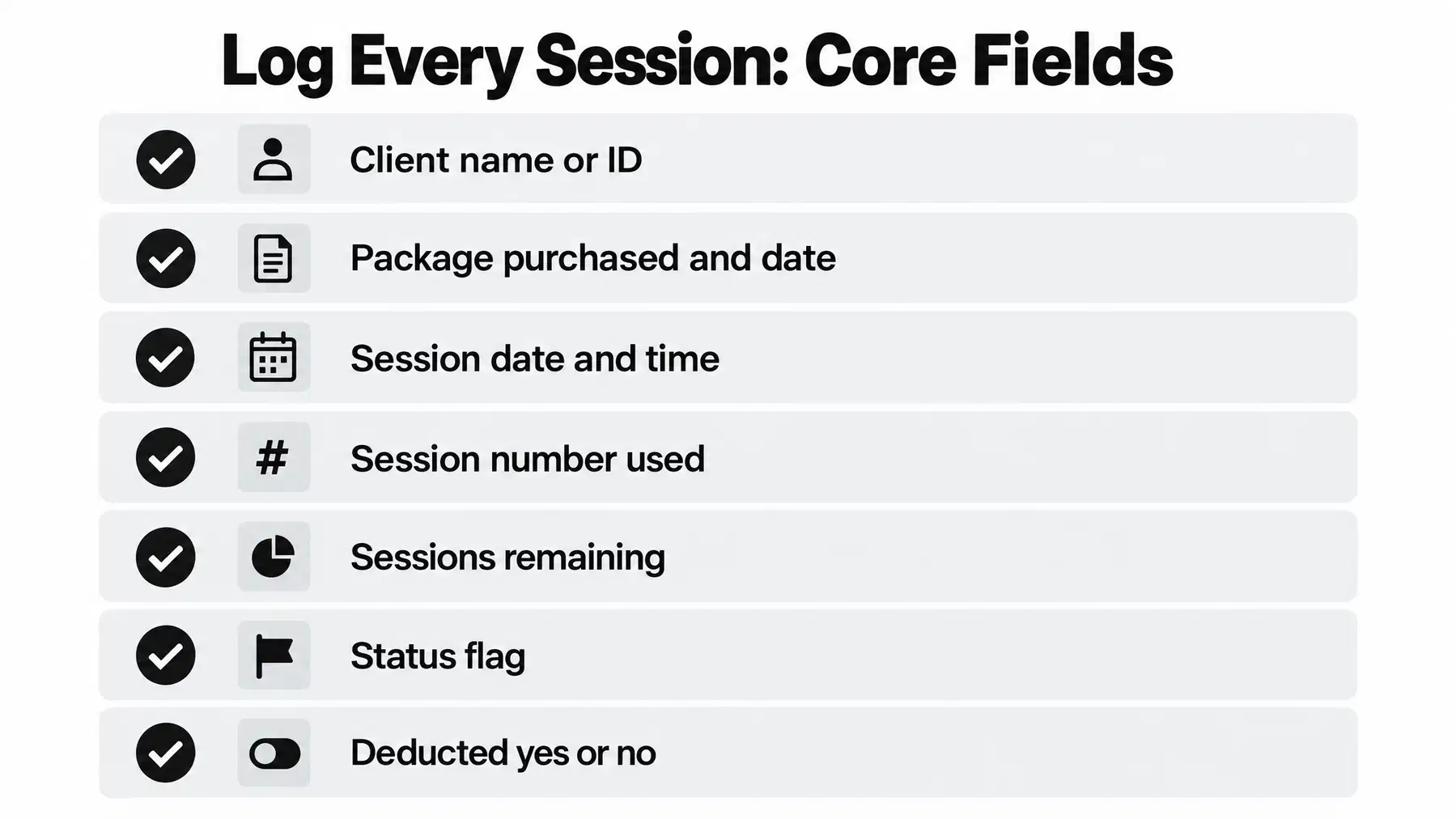
- Client name or ID, so there is no ambiguity between two people called Dan
- Package purchased, including size (for example 10 sessions) and purchase date
- Session date and time, as it actually happened, not as it was scheduled
- Session number used, for example 4 of 10
- Sessions remaining after this session, as a running balance
- Status flag: completed, late cancellation, early cancellation, or no-show
- Deducted? yes or no, so the balance is always explainable
The single most important habit is logging at the moment of the session. Not that evening, not on Sunday. The gap between the session and the log entry is where drift comes from, and drift always seems to favour the client's memory over yours.
Tracking sessions used vs. sessions left: the system the top results skip
This is package accounting, and it has rules. Write them down once and apply them the same way for everyone.
Starting balance. When a client buys, the balance is the package size. Record the purchase date and the payment reference alongside it, because disputes are usually about money, not memory.
Deducting per session. Every completed session takes one off the balance. Never batch this at month-end. A running balance is always current; a month-end tally is a reconstruction, and reconstructions invite argument.
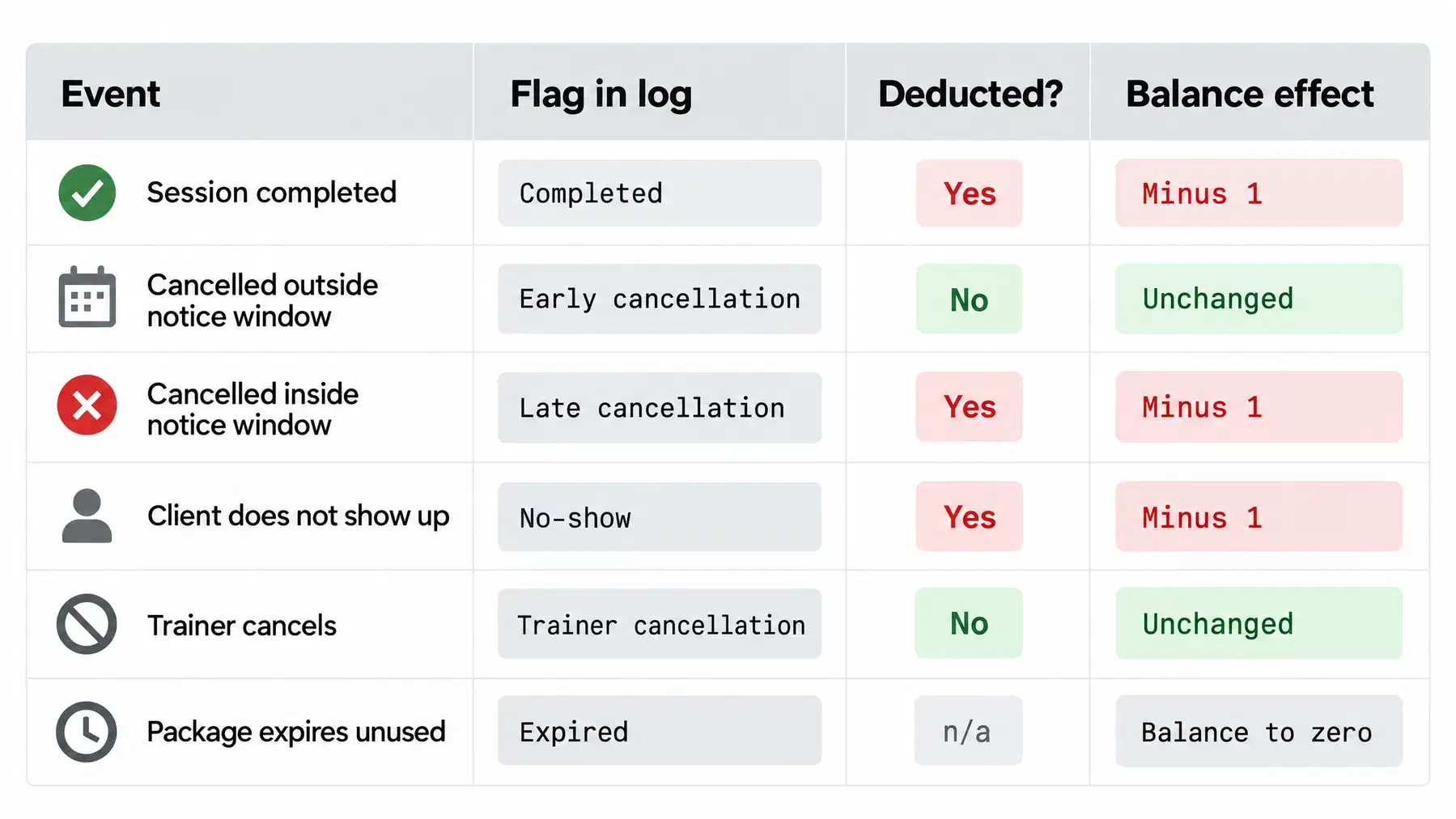
Cancellations. A common industry practice is to require 24 hours' notice, with the session still deducted if the client cancels later than that. Whatever window you choose, the log should show both the flag and the deduction decision, so the balance is never a mystery.
Expiries and rollovers. Decide whether a 10-session package expires after, say, three months, and whether unused sessions roll into the next package. Put the expiry date in the record at purchase so you can see it coming rather than discover it in an awkward conversation.
Client visibility. The last piece the top results skip entirely: clients should be able to check their own balance without texting you. Every "how many have I got left?" message is a small tax on your evening, and your answer is only as good as your last log entry.
| Event | Flag in log | Deducted? | Balance effect |
|---|---|---|---|
| Session completed | Completed | Yes | Minus 1 |
| Cancelled outside your notice window | Early cancellation | No | Unchanged |
| Cancelled inside your notice window | Late cancellation | Yes | Minus 1 |
| Client does not show up | No-show | Yes | Minus 1 |
| Trainer cancels | Trainer cancellation | No | Unchanged |
| Package expires with sessions unused | Expired | n/a | Balance to zero, noted |
How to track client sessions as a personal trainer with a spreadsheet
If you are not ready for software, a spreadsheet is a legitimate starting point.
- Create one tab per client. Shared tabs get messy fast and make it hard to see a single balance at a glance.
- Set up columns for date, session number, status, deducted (yes/no), sessions remaining, and notes.
- Put the package size in a fixed cell at the top, for example B1 = 10, along with the purchase date and expiry date.
- Use a formula for the balance. Sessions remaining = package size minus the count of rows marked as deducted. A COUNTIF on your deducted column does this and updates itself.
- Add a summary tab that pulls each client's name and current balance into one row, so you can scan every client in a few seconds.
- Conditional-format low balances. Highlight anything at two or fewer sessions left in amber, so renewals never surprise you.
Be honest about the limits. A spreadsheet has no client-facing view, so you still field the "how many left?" texts, and it has no link to payment, so renewals are still a manual chase.
When spreadsheets stop working
There is no exact client count where a spreadsheet fails, but there are clear trigger points. If two or more of these are true for you now, the spreadsheet is already costing you more than it saves.
- You have more than a handful of active clients on packages at the same time
- Clients regularly message you to ask how many sessions they have left
- You are chasing renewal payments by text or invoice, after the fact
- You sell multiple package sizes, and some have different expiry rules
- You need to log from your phone between sessions, not at a laptop later
- Someone has disputed a session count in the last few months
- Another trainer covers your sessions and needs to update the same records
Business skills like client retention and smooth renewals are now treated as core to a sustainable training career, not an optional extra, according to an industry review of trends shaping personal training. Package admin sits right in the middle of that.
What to look for in dedicated session tracking software
Most "personal trainer client management" tools are built around programming and progress. Few are built around the package. If you are choosing session package tracking software, judge it on four things.
- One-tap logging. Marking a session used should take a single action on your phone, seconds after the session ends. If it takes six taps, you will stop doing it.
- A client-facing view with no app login. Clients should see sessions left on a link, not download an app and remember a password.
- Payment choices for renewals. When the balance runs low, clients can use the methods the trainer enables, such as a Venmo request or card checkout through their own Stripe account.
- An audit trail. Every deduction timestamped and attributable, so a dispute is settled by the record rather than by goodwill.
PacksLeft is built for session packages. You can log sessions in one tap and give clients a private link to check their balance. Trainers can offer Venmo requests, card checkout through their own Stripe account, or both. Venmo payments happen in Venmo; you confirm receipt before PacksLeft records the payment and adds sessions.
How to handle cancellations and no-shows in your tracking system
Start with a written policy, shared before the first session and ideally attached to the package purchase. It should state the notice window, what counts as a no-show, whether late cancellations are deducted, and what happens if you cancel.
In the log, keep cancellation and no-show as separate flags even when both are deducted. They mean different things for the relationship: one client is disorganised, the other may be disengaging, and you want to see the pattern before the package ends.
Tie it back to billing. If a deducted late cancellation is not recorded as deducted, the client reaches zero sessions while your log still shows one left, and you deliver a free session you did not agree to. Accurate attendance tracking in personal training is just billing accuracy wearing different clothes.
How to tell it worked: a client questions a count, you open the record, and the dates and flags answer it in under a minute with no debate.
Tracking metrics for weight loss vs. muscle gain clients
These are progress metrics, and they sit on top of the session log rather than replacing it. For weight loss clients, track body composition and adherence. For muscle gain, track strength benchmarks on key lifts and training volume.
Assessment batteries used in general populations typically combine several measures rather than relying on a single number, as shown in research on active fitness and performance assessment. Pick two or three metrics per goal and keep them stable, so comparisons mean something.
How often to reassess client progress alongside session tracking
Fitness industry guidance commonly suggests reassessing client progress every four to six weeks for most goals. That is frequent enough to catch a stalled plan and far enough apart that real change has had time to happen.
The practical trick is to anchor reassessments to package renewal points. If someone buys ten sessions and trains twice a week, that is roughly five weeks, which lands neatly in the window. Reassess at session eight or nine, show the results, and the renewal conversation is about evidence rather than admin.
Universities and health bodies publish general guidance on physical activity and health that is worth reading alongside your own assessment choices, particularly for clients with health considerations.
A simple setup checklist to get started this week
- Pick one method and only one: a notebook, a spreadsheet, or an app. Two systems guarantees two different balances.
- Define your package sizes and write down expiry rules and whether unused sessions roll over.
- Write a one-paragraph cancellation policy with your notice window and send it to every active client.
- Decide how clients see their balance. A link they can open without an app beats answering texts.
- Log for one full week before changing anything else, so you learn where you actually forget.
- Reconcile at the end of that week. Compare your log to your payments and fix every gap before week two.
When it does not work: if you are still missing entries after two weeks, the problem is almost always friction, not discipline. Shorten the log to the minimum fields, move it to wherever your phone already is, and if it still slips, switch to a tool that makes tracking sessions and renewals a single tap.
Frequently asked questions
What is the best app for personal trainers to track client sessions?
The best app logs a session in a single tap and shows clients their own balance without a login. PacksLeft is built for session packages, with one-tap tracking, a no-app client link, Venmo requests and card checkout through your own Stripe account.
How do I keep track of how many sessions a personal training client has left?
Keep a running balance rather than a month-end tally: record the package size at purchase, then deduct one the moment each session is completed or deducted as a late cancellation. The balance should be visible at a glance to both you and the client.
Is there a free template for tracking personal training clients?
You can build one in a few minutes with a tab per client, columns for date, status, deducted and sessions remaining, and a COUNTIF formula for the balance. It works for a small roster, but gives clients no visibility and no way to pay for a renewal.
Should I use Excel or a dedicated app for my personal training business?
Excel is fine while you have a handful of clients, a single trainer and no renewal chasing. Move to a dedicated app once clients start asking how many sessions they have left, you sell more than one package size, or you log from your phone between sessions.
How do you handle clients who forget to log their own workouts?
Do not make session counts depend on the client logging anything. You log the session, they view the balance. The record that decides billing should always be yours.
How do I track attendance and cancellations for billing purposes?
Use separate status flags for completed, early cancellation, late cancellation and no-show, with a clear yes or no for whether each was deducted. Apply your notice window identically for every client.
Track packs without the spreadsheet chase
PacksLeft keeps package balances, session history, and client links together. Trainers can offer Venmo or Stripe checkout based on what they enable.